Measuring Core Data and SwiftData
Peter Yaacoub •




Introduction
I originally set out with a simple challenge: build the same SwiftUI app four times, each using a different persistence method: Core Data, SwiftData, UserDefaults, and JSON files. The plan quickly shifted. As I dug deeper, the question stopped being which tool is best, because deep down, I knew that the answer was simpler than how I was trying to make it seem.
Instead, I became more interested in sharing what I actually found along the way: poll results, measurements, and a clearer understanding of both Core Data and SwiftData.
But first, let’s rewind.
What is data persistence?
When you create an app, you typically want to preserve information from one launch to the next. In general, this capability is not implicit because storage and efficiency are sacred, so your runtime environment is always stored in volatile memory. Therefore, you actually need a way to tell the machine to store the data in mass storage. That’s data persistence:
The capability of an application to save data so that it can be retrieved [in its latest version] and used later, even after the application has closed or the system has been restarted [1].
In this broader sense, there are multiple ways to achieve this goal in Swift, but these methods don’t solve the same problem or operate at the same abstraction level.
Industry Standards
In my personal projects, I exclusively use UserDefaults and SwiftData, two Apple-native technologies that feel safe, modern, and well integrated. Core Data always seemed intimidating, and rolling my own file storage felt niche. The basis of my thinking remains: if Apple provides frameworks, why not use them?
I assumed most developers shared this mindset, but I wasn’t sure. To test that assumption, I conducted a quick 24-hour poll in two Swift-focused Slack communities, gathering roughly 35 responses in each.
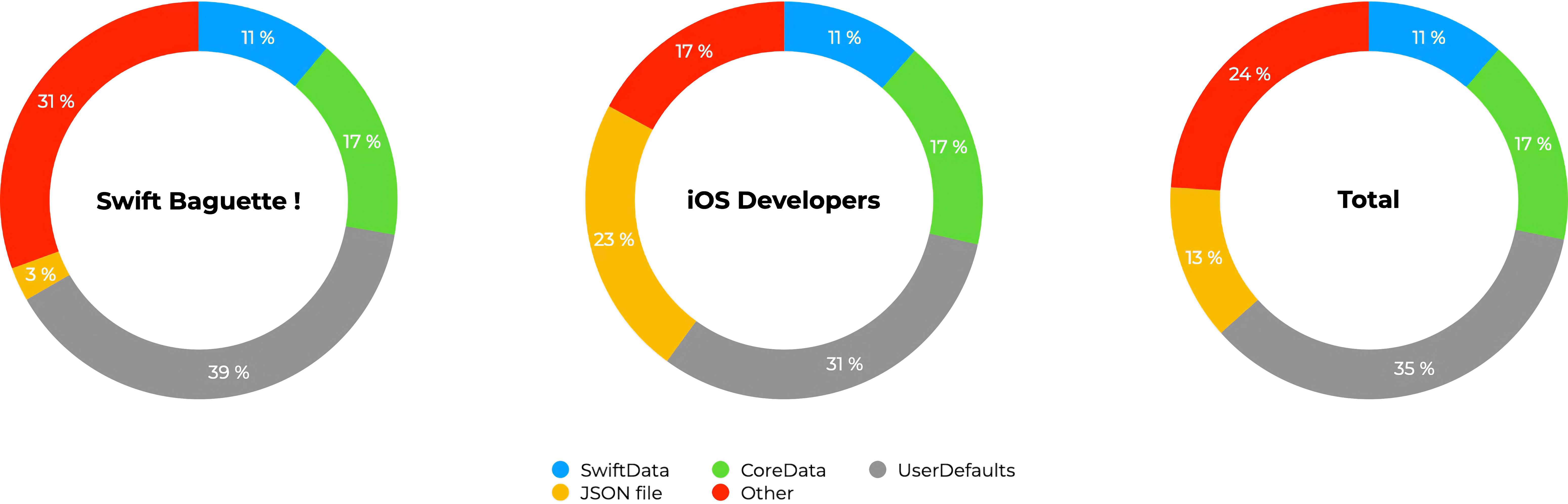
The results were more nuanced than expected. No single method dominated. UserDefaults led with just over a third of responses, while non-native solutions in the “Other” category (SQLite, SQLiteData, GRDB, FMDB, etc.) followed closely with nearly a quarter.
So why focus this article primarily on Core Data and SwiftData?
Partly curiosity. Partly relevance. And partly because persistence is not about popularity, it’s about trade-offs. UserDefaults shines for simple key-value storage but quickly reaches its limits. Third-party tools offer power and flexibility that Apple’s native frameworks can often match, but at the cost of added dependencies and maintenance. That, however, is a broader debate.
Experiment Setup
This experiment builds on the MVVM task app from my article One SwiftUI App, Six Architectures. The app focuses on the four core principles of data persistence: Create, Read, Update, and Delete (CRUD). Using the same functionality across implementations ensures consistency and makes differences in structure, complexity, and performance easier to observe.
To fairly compare both methods, the View layer always remains unchanged, and I avoid framework-specific functionality that would disrupt my architecture. The goal is to see how each tool adapts to the app, not the other way around.
The full source code is available below this article.
Performance Curiosity
Beyond architecture, I was also curious about real-world performance, or, actually, simulator-world performance. For both frameworks, I measure the duration it takes to launch the app by inserting and then reading 0, 1, 1,000, or an extreme 1,000,000 entities on an iPhone 17 Pro simulator running iOS 26.2 on an M1 MacBook Air.
Using Xcode’s debug navigator, I observed:
- CPU usage
- Memory consumption
- Disk activity
- Estimated launch time
I considered comparing lines of code, but code style varies too much for that metric to be of meaningful relevance.
Core Data
Core Data is Apple’s first full-featured data persistence framework for its operating systems. Originally built for Objective-C and later ported to Swift, it has always divided opinions. Some developers say they “had very bad experiences with Core Data,” while others praise it enthusiastically: “Core Data is so good […] it’s so often misunderstood.”
Technically, Core Data is backed by SQLite, “the most used database engine in the world” [2], but it is not merely a relational database wrapper. As Krys Jurgowski explains in a Stack Overflow response:
Core Data does some serious optimizations under the hood that make accessing data much easier without having to dive deep into SQL [3].
Although Core Data can also handle undo/redo, background tasks, synchronization, versioning, and migration [4], persistence is the focus of this article, in its most basic and naïve implementation.
Code
Tasks.swift:
import CoreData
import Foundation

@objc(Task)
final class Task: NSManagedObject, Identifiable {
    @NSManaged var id: UUID
    @NSManaged var title: String
    @NSManaged var isDone: Bool
    @NSManaged var creationDate: Date

    override func awakeFromInsert() {
        super.awakeFromInsert()
        self.id = UUID()
        self.isDone = false
        self.creationDate = Date()
    }
}
TaskModel.xcdatamodel:
<?xml version="1.0" encoding="UTF-8" standalone="yes"?>
<model type="com.apple.IDECoreDataModeler.DataModel" documentVersion="1.0" lastSavedToolsVersion="24512" systemVersion="25C56" minimumToolsVersion="Automatic" sourceLanguage="Swift" userDefinedModelVersionIdentifier="">
    <entity name="Task" representedClassName="Task" syncable="YES">
        <attribute name="creationDate" attributeType="Date" usesScalarValueType="NO"/>
        <attribute name="id" attributeType="UUID" usesScalarValueType="NO"/>
        <attribute name="isDone" attributeType="Boolean" defaultValueString="NO" usesScalarValueType="YES"/>
        <attribute name="title" attributeType="String" defaultValueString="Untitled"/>
    </entity>
</model>
TaskListViewModel.swift:
import Combine
import CoreData
import Foundation

@MainActor
final class TaskListViewModel: ObservableObject {
    private let context: NSManagedObjectContext

    @Published private(set) var tasks: [Task] = []
    @Published var taskTitle: String = ""

    init(context: NSManagedObjectContext) {
        self.context = context
        fetchTasks()
    }

    func addTask() {
        guard !taskTitle.trimmingCharacters(in: .whitespacesAndNewlines).isEmpty else { return }
        let task = Task(context: context)
        task.title = taskTitle
        taskTitle = ""
        saveTasks()
    }

    func deleteTask(_ indexSet: IndexSet) {
        for index in indexSet {
            context.delete(tasks[index])
        }
        saveTasks()
    }

    func fetchTasks() {
        let request = NSFetchRequest<Task>(entityName: "Task")
        request.sortDescriptors = [NSSortDescriptor(keyPath: \Task.creationDate, ascending: true)]
        do {
            tasks = try context.fetch(request)
        } catch let error {
            fatalError("Error fetching tasks: \(error)")
        }
    }

    func saveTasks() {
        do {
            try context.save()
            fetchTasks()
        } catch let error {
            fatalError("Error saving tasks: \(error)")
        }
    }

    func toggleTask(_ id: UUID) {
        guard let index = tasks.firstIndex(where: { $0.id == id }) else { return }
        tasks[index].isDone.toggle()
        saveTasks()
    }
}
Persistence.swift:
import CoreData

struct PersistenceController {
    static let shared = PersistenceController()

    @MainActor
    static let preview: PersistenceController = {
        let result = PersistenceController(inMemory: true)
        let viewContext = result.container.viewContext
        let testingSample = 1
        for i in 0..<testingSample {
            let newItem = Task(context: viewContext)
            newItem.title = "Sample Task \(i)"
        }
        do {
            try viewContext.save()
        } catch {
            let nsError = error as NSError
            fatalError("Unresolved error \(nsError), \(nsError.userInfo)")
        }
        return result
    }()

    let container: NSPersistentContainer

    init(inMemory: Bool = false) {
        container = NSPersistentContainer(name: "TaskModel")
        if inMemory {
            container.persistentStoreDescriptions.first!.url = URL(fileURLWithPath: "/dev/null")
        }
        container.loadPersistentStores(completionHandler: { (storeDescription, error) in
            if let error = error as NSError? {
                fatalError("Unresolved error \(error), \(error.userInfo)")
            }
        })
        container.viewContext.automaticallyMergesChangesFromParent = true
    }
}
Measurements
| 0 | 1 | 1000 | 1000000 | |
|---|---|---|---|---|
| CPU (max) | 0.89 | 0.64 | 0.57 | 2.04 |
| Memory (max) (MB) | 42.6 | 43.1 | 46.2 | 740.9 |
| Memory (stable) (MB) | 42.3 | 42.8 | 46.0 | 488.7 |
| Disk (max) (MB/s) | 96.4 | 87.7 | 72.9 | 118.8 |
| Launch time (s) | 2 | 2 | 2 | 14 |
Analysis
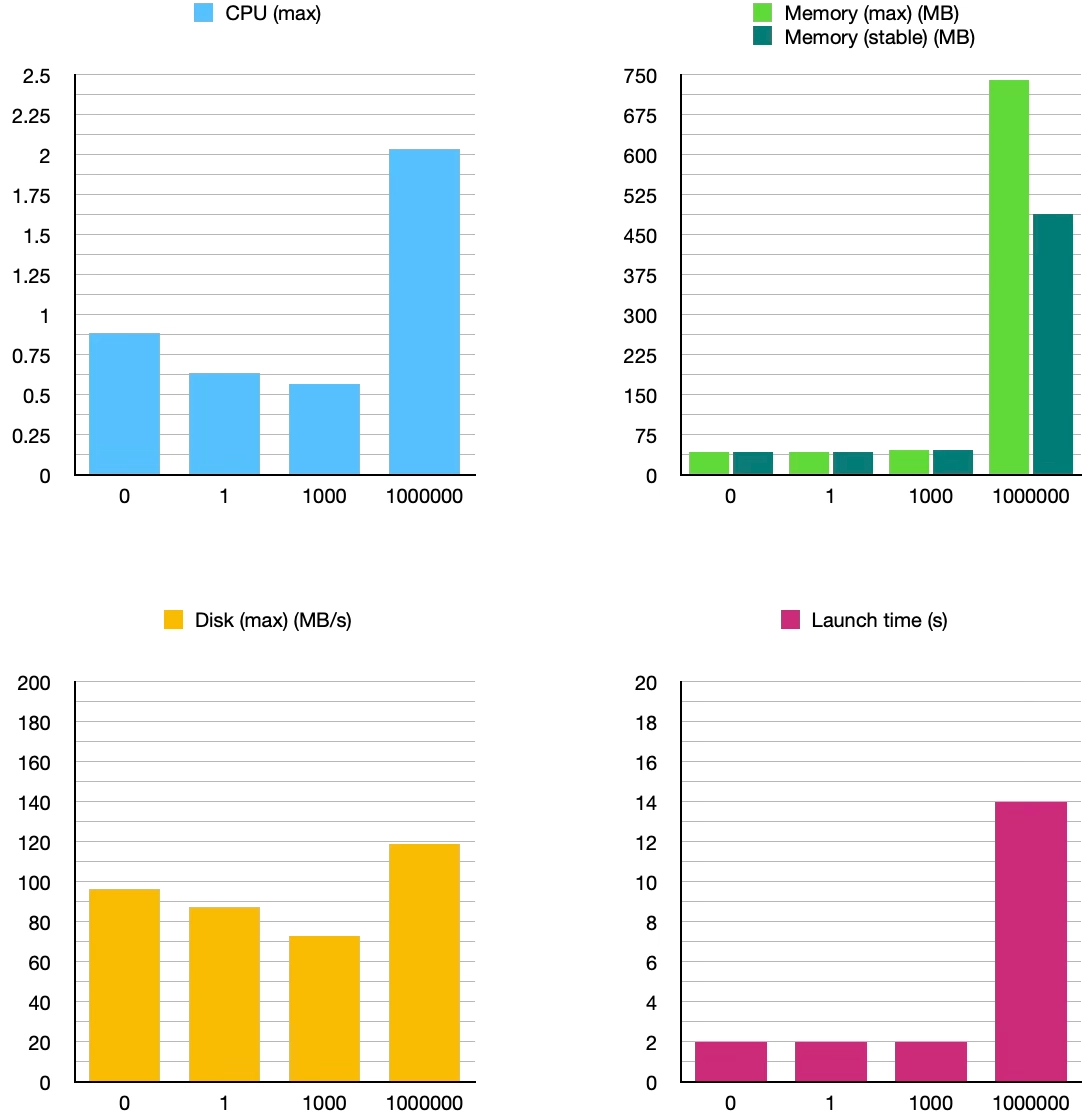
As we multiply the number of entries by 1,000 each time, we can see that from 1 to 1,000, the measurements remain roughly similar. The jump to 1,000,000 is where things become interesting:
- CPU usage almost triples
- Maximum memory consumption increases by ~15×
- Stable memory consumption increases by ~10×
- Disk activity increases by ~2.5×
- Estimated launch time increases by ~6×
These numbers may look alarming in absolute terms, but they are far from the 1,000× multiplier applied to the number of entities. Code choices also influence these results: SwiftUI rendering, eager fetching, and storing entities in the view model all contribute to overhead.
Core Data appears to scale sub-linearly in several dimensions. Even with naïve SwiftUI integration, it handles large datasets with relatively controlled growth in resource usage. The trade-off lies more in complexity and developer ergonomics than raw performance.
SwiftData
In Apple’s own words, SwiftData is a combination of:
Core Data’s proven persistence technology and Swift’s modern concurrency features [5].
In other terms, it represents Apple’s attempt to make persistence feel like a natural extension of SwiftUI rather than a separate, heavyweight system. Some evolved concepts include:
@Modelinstead of managed object subclasses- Schema inferred from types rather than
.xcdatamodeldfiles ModelContextinstead ofNSManagedObjectContext
Despite these changes, developers remain mixed. Some view SwiftData as a welcome simplification. Others criticize it as a “black box” that hides important behavior and limits flexibility. Another common observation is that SwiftData feels most at home inside SwiftUI views, whereas layered architectures expose its rough edges.
Code
Tasks.swift:
import Foundation
import SwiftData

@Model
final class Task: Identifiable {
    var id: UUID = UUID()
    var title: String
    var isDone: Bool = false
    var creationDate: Date = Date()

    init(title: String) {
        self.title = title
    }
}
TaskListViewModel.swift:
import Combine
import Foundation
import SwiftData

@MainActor
final class TaskListViewModel: ObservableObject {
    private let context: ModelContext

    @Published private(set) var tasks: [Task] = []
    @Published var taskTitle: String = ""

    init(context: ModelContext) {
        self.context = context
        fetchTasks()
    }

    func addTask() {
        guard !taskTitle.trimmingCharacters(in: .whitespacesAndNewlines).isEmpty else { return }
        let task = Task(title: taskTitle)
        context.insert(task)
        taskTitle = ""
        saveTasks()
    }

    func deleteTask(_ indexSet: IndexSet) {
        for index in indexSet {
            context.delete(tasks[index])
        }
        saveTasks()
    }

    func fetchTasks() {
        let request = FetchDescriptor<Task>(predicate: nil, sortBy: [SortDescriptor(\.creationDate)])
        do {
            tasks = try context.fetch(request)
        } catch let error {
            fatalError("Error fetching tasks: \(error)")
        }
    }

    func saveTasks() {
        do {
            try context.save()
            fetchTasks()
        } catch let error {
            fatalError("Error saving tasks: \(error)")
        }
    }

    func toggleTask(_ id: UUID) {
        guard let index = tasks.firstIndex(where: { $0.id == id }) else { return }
        tasks[index].isDone.toggle()
        saveTasks()
    }
}
Persistence.swift:
import SwiftData

struct PersistenceController {
    static let shared = PersistenceController()

    @MainActor
    static let preview: PersistenceController = {
        let result = PersistenceController(inMemory: true)
        let context = result.container.mainContext
        let testingSample = 1
        for i in 0..<testingSample {
            let newItem = Task(title: "Sample Task \(i)")
            context.insert(newItem)
        }
        do {
            try context.save()
        } catch {
            fatalError("Unresolved error: \(error)")
        }
        return result
    }()

    let container: ModelContainer

    init(inMemory: Bool = false) {
        let schema = Schema([Task.self])
        let configuration = ModelConfiguration(schema: schema, isStoredInMemoryOnly: inMemory)
        do {
            container = try ModelContainer(for: schema, configurations: [configuration])
        } catch {
            fatalError("Could not create ModelContainer: \(error)")
        }
    }
}
Measurements
| 0 | 1 | 1000 | 1000000 | |
|---|---|---|---|---|
| CPU (max) | 0.56 | 0.49 | 0.63 | 1.95 |
| Memory (max) (MB) | 42.8 | 43.2 | 47.8 | 5100 |
| Memory (stable) (MB) | 42.5 | 43.0 | 47.6 | 1240 |
| Disk (max) (MB/s) | 78.2 | 81.0 | 92.5 | 117.2 |
| Launch time (s) | 2 | 2 | 2 | 120 |
Analysis
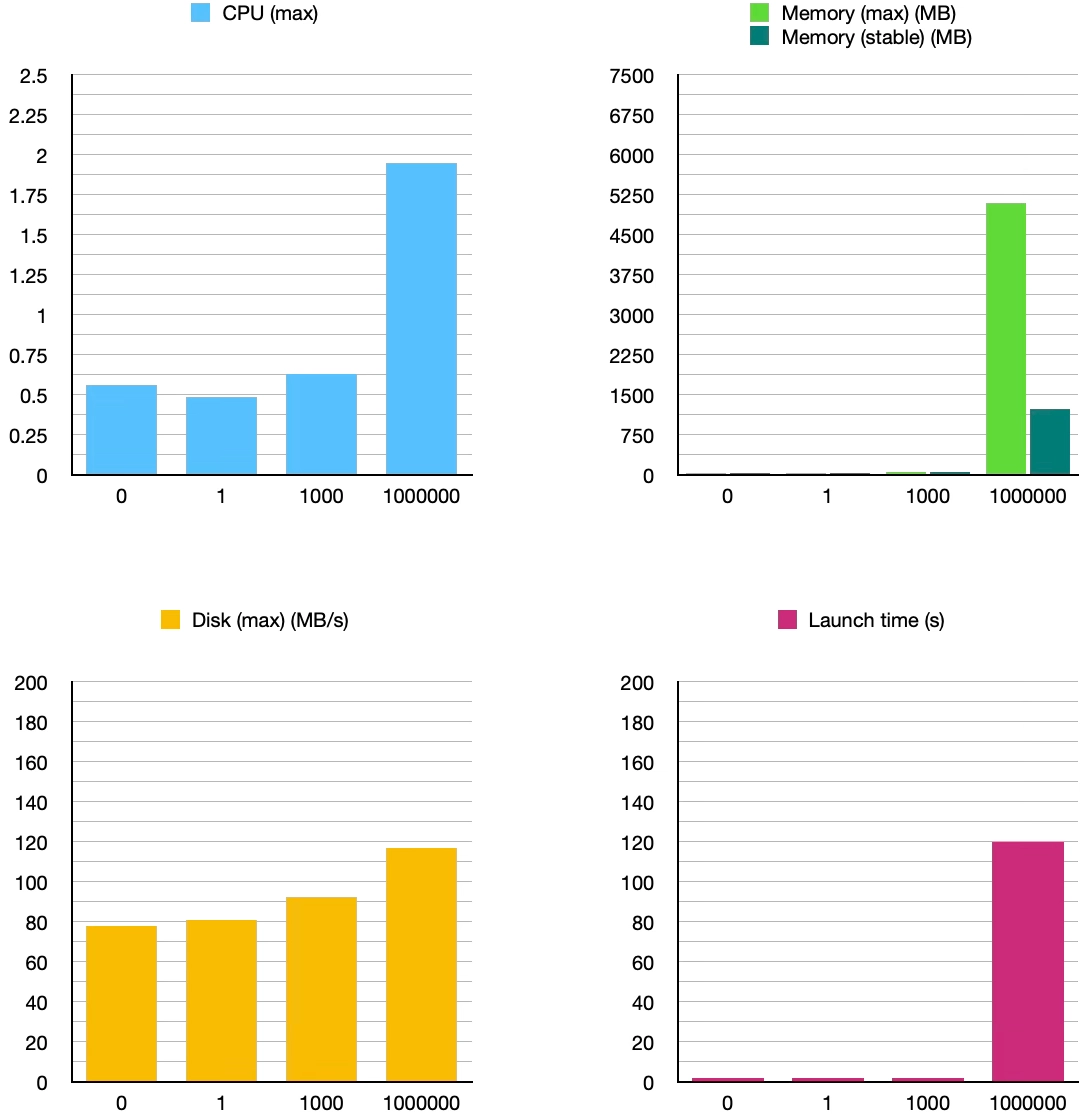
For small datasets, SwiftData behaves very similarly to Core Data. CPU usage, memory consumption, disk activity, and estimated launch times remain nearly identical from 0 to 1,000 entities.
The divergence appears at 1,000,000 entities:
- Maximum memory consumption increases dramatically by ~107×, or ~7× compared with Core Data
- Stable memory usage also significantly increases by ~26×, or ~2.5× compared with Core Data
- Estimated launch time jumps by 60×, or ~8.5× compared with Core Data
In this setup, SwiftData appears to materialize more data in memory, possibly due to eager fetching, lack of batching, or current framework optimizations.
Perhaps with careful tuning, results could differ. Still, it seems that abstraction has a cost, especially at scale [6].
Core Data vs. SwiftData. What actually matters?
Well first, Apple writes Core Data with a space and SwiftData without.
Otherwise, from this experiment, some observations emerge:
SwiftData builds on Core Data, which in turn builds on SQLite. This can lead to more predictable performance characteristics in Core Data, particularly in large datasets and naïve implementations, while SwiftData prioritizes ergonomics and syntax. Indeed, for small to medium datasets, differences are negligible. At extreme scales, Core Data’s mature optimizations provide more appropriate behavior.
Considering architectural compatibility, both SwiftData and Core Data can adapt to diverse architectural patterns. In this case, the newer framework’s syntax looks increasingly similar to its predecessor.
Again, these results reflect a naïve, eager-loading implementation without batching, pagination, or advanced fetch optimizations. Different architectural choices or framework-idiomatic patterns may significantly alter performance characteristics.
Conclusion
This article started as a comparison. It ended as a reminder: persistence is not about choosing the best tool, it’s about choosing the right trade-offs.
If I were starting a new SwiftUI app today:
- I would choose SwiftData for small to medium apps, rapid prototyping, or projects deeply integrated with SwiftUI.
- I would choose Core Data for large datasets, long-lived projects, or architectures requiring fine-grained control.
UserDefaults still has its place for trivial settings, and third-party databases remain compelling, notably for cross-platform needs or advanced querying.
Now you can disagree, because there’s no right, and honestly, that’s the point.